
Fast Laravel Case Study: Laravel News
Main Thread • 7 min read
Over the past few months, I've been working with Eric Barnes to make Laravel News faster. This is the first in a series of case studies I wanted to do for Fast Laravel. Proving these page caching strategies work for more than just "simple" Laravel applications.
Laravel News is a high traffic site. While it does not have authentication, it does have dynamic content. New blog posts, links, and ads change hourly. In addition, there are segments that change on each page. Many developers might assume you can't cache such a site. But you can. And we did.
We took a systematic approach and started with the most-requested pages: home page, blog page, article pages, and links. These pages account for roughly 70% of the total requested pages. So, theoretically, caching these would mean a 70% reduction in web server traffic.
Before getting started, I ran the Fast Laravel Shift. This automates the configuration of a Laravel application for page caching - disabling stateful Laravel features and setting HTTP cache headers. Basically, everything covered in the first few lessons of the Fast Laravel video course.
Once the Laravel News application was configured for page caching, it was time to review each page to ensure it could be cached. In the end, I made three main refactors.
Converting from Livewire
Laravel News was built with Livewire. Not because it needed Livewire. Just because it was. A textbook example of YAGNI. Every page was a Livewire component. But only one (the newsletter form) actually used Livewire's reactivity.
The problem is Livewire embeds component state into the rendered HTML. That state is tied to the original page render and subsequent Livewire requests. If that HTML is cached and served later, Livewire's initialization data can become invalid, resulting in 419 responses or components that fail to hydrate properly.
Fortunately, since nearly all of these Livewire components simply rendered a view, they could be converted to Blade components. In most cases, anonymous Blade components. The refactor was very straightforward.
- Move the Livewire component class to
app/View/Components(if needed) - Move the underlying Blade template to
resources/views/components - Replace any Livewire specific code (
extends,$this->prefix, etc)
While there were only a few pages, some had nested components. So there was a lot to convert. After I proved the process by hand, I guided AI to do the rest. Once converted, I knew all of the pages were technically cacheable.
Here's an example of the Livewire component for New Links. As you can see, there was no reactivity - simply Livewire rendering an initial view.
class LinksNew extends Component{ use WithPagination; #[Computed] public function links() { return Link::active() ->with('user') ->orderBy('published_at', 'desc') ->simplePaginate(15); } public function render() { return view('livewire.links-new') ->layout('layouts.guest', [ 'title' => 'New Community Links | Laravel News', 'description' => 'Latest community Laravel Links', 'ogUrl' => 'https://laravel-news.com/links/new', 'canonical' => 'https://laravel-news.com/links/new', ]); }}This was moved to an invokable controller which rendered the same view. The links were inlined as a view variable. Since the page is cached for a day, that beats any caching from Livewire's computed property. The layout data was passed in the template.
class NewLinks extends Controller{ public function __invoke(): View { return view('links.new', [ 'links' => Link::active() ->with('user') ->orderBy('published_at', 'desc') ->simplePaginate(15), ]); }}Handling dynamic segments
Although these pages were cacheable, some had a few dynamic segments. The notification at the top of the homepage. The sponsor cards. The newsletter signup form. All of these were dynamic in some way.
For example, the sponsor card needs to rotate every hour. But we cache the page for a day. We don't want to bust the cache every hour to swap the card. So the cached page needs to update the sponsor card. To do that, we used good old AJAX.
Since Laravel News already uses Alpine.js (as a Livewire dependency), I opted for Alpine AJAX plugin. Then I added a few HTML attributes on these segments, and created some endpoints to return HTML fragments. When the cached page loads, Alpine AJAX swaps the placeholders with fresh content from the server.
This is the HTML placeholder for the banner which appears the top of the Laravel News site. The API endpoint returns the HTML for the currently rotating ad. The ad is cached for one minute by the application. Even though this request does hit the origin server, it's only 800 bytes taking about 100ms. So its lightweight and relatively fast.
<div id="top-ad" x-init="$ajax('/api/ad/top')"></div>There are all sorts of ways to swap segments of an HTML page. In Fast Laravel I use HTMX. It's really your choice based on your project stack. What's important is knowing this as a strategy to cache even partially dynamic pages.
Managing the cache
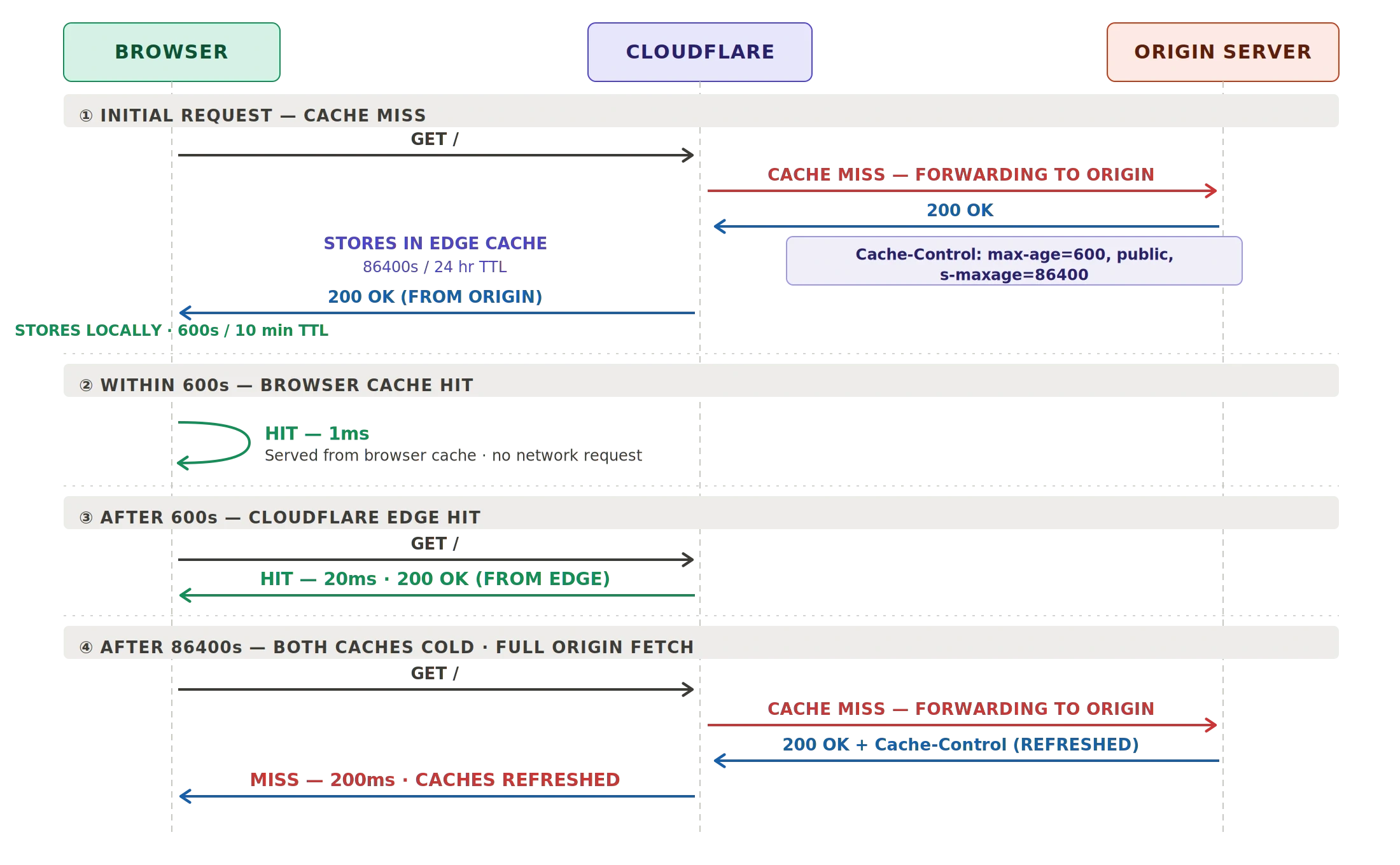
Caching is the easy part. The real challenge is cache management. Knowing how long to cache and when to clear the cache. For Laravel News, we knew we wanted to cache the pages for a relatively long time. We started by caching for a day at the edge and a few minutes in the browser.
The browser cache is the fastest. Cached pages are served directly from the user's browser. There is no web call. So you can see near instant response times. This allows the user to navigate a site very quickly. For example, reading an article, then returning to the home or blog page to read another.
While the browser cache is fresh, it will not make a web request. So you don't want to cache on the browser for long. Again, we chose 10 minutes. A timeframe to align with typical usage. After that time, the browser would send a request to Cloudflare which could return its cached version. If the page had not changed, you got a quick 304. If the page changed, it was served from Cloudflare's edge. Both of which happen under 100ms.
Cloudflare's cache is what we could control. We could purge from their dashboard or their API. We added API calls to do so within model events. For example, when an Article model was updated, its cached page was purged by URL (slug). Using events covered most of the cases where we needed to purge the cached pages.
class ArticleUpdatedActions{ public function update(Article $article) { Cache::forget('home-latest'); Cache::forget('home-featured'); Cache::forget('home-sponsored'); Cache::forget('home-tutorials'); Cache::forget('home-videos'); Cache::forget('home-packages'); resolve(CachePurgeService::class)->purgeCache([ route('home'), route('blog'), route('article.details', $article), ]); }}The gotcha for Laravel News was scheduled content. Articles are written beforehand and scheduled to be published. So there's no model event that fires when a scheduled article goes live. The published_at timestamp is already set - the article just becomes visible when it passes now().
Again, there are a lot of ways to handle this. But the simplest approach was to piggyback on an existing scheduled command that shares new articles and links to social media. Since that command already runs when content is published, we purged the cache there too. Worst case, stale content was served for five minutes until the command ran.
Competing with Laravel Cloud
One additional gotcha was Laravel Cloud. Laravel Cloud now has an edge caching feature, which uses Cloudflare underneath. However, this created two competing caches. We'd clear the cache in Cloudflare, but Laravel Cloud would serve its cached version. In the end, we bypassed Laravel Cloud's caching since we were already managing Cloudflare's cache directly.
The end result
In the end, the caching flow was:
- Laravel initially renders the page
- Cloudflare caches the page for a day
- The browser caches the page for 10 minutes
- Dynamic segments are refreshed independently with AJAX
- Model events purge affected pages when content changes
No custom infrastructure. No paid services. Just standard HTTP caching using Cloudflare's free plan. Here's a diagram of the request flow:
After implementing these changes, Laravel News went from 15% cached to 60% cached. Sometimes reaching 70%. I expect these numbers are actually much higher. However, Laravel News is a high traffic site. So it receives a lot of requests (some invalid), diluting the percent cached. And, with cache busting dialed in, we could likely cache longer.
The main value is the speed. The highest traffic pages load from the edge in around 20ms. Then they're served from the browser in around 1ms. Eric said repeatedly, "The site just feels faster!"
But I expect real value too. The underlying infrastructure now receives less than half of the traffic. That means Laravel News could likely be downgraded to save money. This is something Eric plans to revisit in a few months.
Laravel News isn't a special case. Most Laravel applications have the same caching opportunities. Often with little or no refactors. And edge caching is free with Cloudflare, Laravel Cloud, and others. In the end, its just about applying the right caching strategies, systematically. That's exactly what Fast Laravel teaches. If you want your Laravel app to be as fast as possible, it's worth a watch.
Find this interesting? Let's continue the conversation on Twitter.